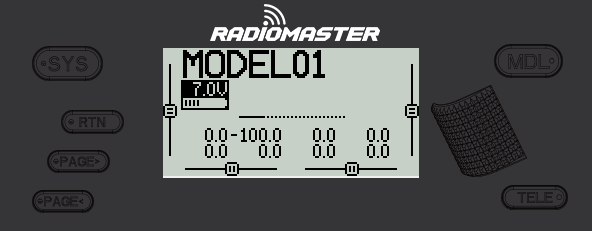
Common buttons user for radio menu navigation (e.g. RM Zorro)
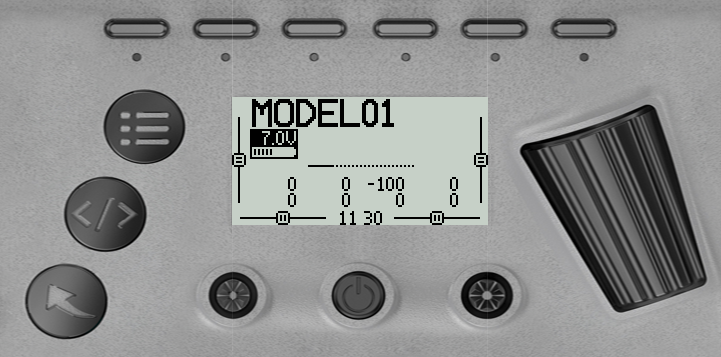
Common buttons user for radio menu navigation (e.g. Jumper TPro)
The buttons below are commonly used to navigate EdgeTX. If your radio does not have these buttons, please consult the [manufacturer's documentation](https://drive.google.com/drive/folders/1HPqNbVZT9yzQsHoVKRPTM1YFeBXevYS9?usp=sharing) to see your radio's specific button configuration.
### **Buttons:**
* **\[SYS]** - System Button\
\- Short press **\[SYS]** button from the main screen to go to the [Tools](https://zkl2333.gitbook.io/edgetx-user-manual/v2.11-en/bw-radios/radio-settings) page of the Radio Settings menu.
* **\[MDL]** - Model Button\
\- Short press **\[MDL]** button from the main screen to go to the [Model Select ](https://zkl2333.gitbook.io/edgetx-user-manual/v2.11-en/bw-radios/model-select)page of the Models menu
* **\[RTN] -** Return / Back\
\- Short press **\[RTN]** button to return to the previous page, previous menu or cancel action
* **\[PAGE>] / \[PAGE<]** - Page next & page previous\
\- Used to navigate between different screens, tabs, or options settings, depending on the screen.
* **\[TELE] -** Telemetry\
\- Press the **\[TELE]** button to go to the configured telemetry screens. More information about the telemetry screens is found in the [Display ](https://zkl2333.gitbook.io/edgetx-user-manual/v2.11-en/bw-radios/model-select/display)section.
* **\[Roller]** or **\[Dial]** - Next & previous value\
The roller is used to navigate through menu options.
* **\[Enter]** - Accept\
\- Used to select option, function or accept value\
\- Push **\[Roller]** or **\[Dial]** button to select or enter.