# Channel Monitor

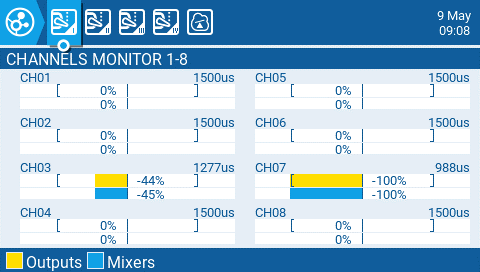
The Channel Monitor shows both the output value (top bar) and mix value (bottom bar) for each of the 32 radio channels, spread across 4 pages of 8.

<figure><img src="https://77164042-files.gitbook.io/~/files/v0/b/gitbook-x-prod.appspot.com/o/spaces%2FUZeEhX4mYsDsoTCSjRyi%2Fuploads%2Fgit-blob-abd0929072e3d073729c8bb0501ac5733f4ac257%2Fchannelmonitor.png?alt=media" alt=""><figcaption><p>Channels Monitor</p></figcaption></figure>

The 5th page of the channel monitor is the logical switches monitor. On this page, you will see the status (activated/non-activated) of all logical switches. Logical switches that are activated are highlighted.
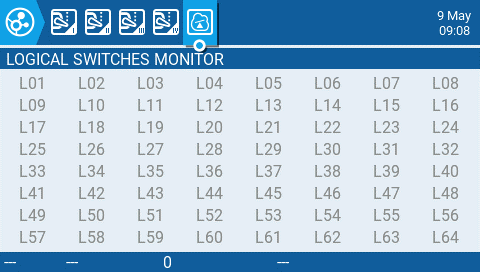
<figure><img src="https://77164042-files.gitbook.io/~/files/v0/b/gitbook-x-prod.appspot.com/o/spaces%2FUZeEhX4mYsDsoTCSjRyi%2Fuploads%2Fgit-blob-ee2186345c494a0c49d5b095819d9ec5435b25bd%2Fchannelmonitor2.png?alt=media" alt=""><figcaption><p>Logical Switches Monitor</p></figcaption></figure>
